
Yes it can, and it happens faster than most business owners expect. A single compromised workstation can spread malware to every device on your network within minutes if the right protections are not in place. Understanding how this happens is the first step to making sure it does not happen to your business.
How Malware Spreads From One Computer to the Rest
Most people picture malware as something that affects one machine. Modern malware is designed to move laterally across networks, jumping from device to device through shared drives, email, and open connections.
The Cybersecurity and Infrastructure Security Agency (CISA) warns that lateral movement is one of the most damaging tactics used in attacks on small business networks. If you have already noticed signs of vulnerability in your network, this risk is even higher.
- Malware can spread through shared folders and mapped drives
- Infected email attachments can reach every inbox on your server
- Worms move between devices without any user interaction
- Ransomware encrypts files across every connected drive it can reach
- Compromised credentials give attackers access to your entire network
How Malware Moves Across an Office Network
Each of these methods is actively used in attacks on small businesses every day. One infected machine is rarely the end of the problem. It is the starting point.
Through Shared Network Drives
Malware on one computer can read, modify, and encrypt every file on mapped network drives. Ransomware targets shared drives first because that is where the most valuable business data lives, and one employee opening the wrong attachment can lock every shared file in minutes.
Through Email From Inside Your Network
Some malware hijacks the infected user’s email and sends itself to every contact in the address book. Because the email comes from a trusted colleague, other employees open it without hesitation, spreading the infection to every department by lunchtime.
Through Worms That Need No User Interaction
Unlike viruses that require a click, worms scan for open ports, unpatched systems, and weak passwords to spread on their own. The EternalBlue exploit used in the WannaCry attack spread to over 200,000 computers across 150 countries in a single day without anyone clicking anything.
Through Stolen Login Credentials
If malware captures an employee’s username and password, the attacker can use those credentials to access other systems on the network. This is especially dangerous when employees use the same password across multiple platforms or when admin credentials sit on a standard workstation.
Through Unpatched Software Vulnerabilities
Malware targets known security holes in operating systems and applications that have not been updated. One machine running outdated software becomes an entry point, and the same unpatched vulnerabilities on other machines give malware a clear path across the network.
Through Connected Printers and IoT Devices
Printers, security cameras, and smart devices rarely receive security updates and often still have default passwords that were never changed. Attackers use these overlooked devices as stepping stones to reach more valuable targets on your network.
Through USB Drives and External Media
An infected USB drive plugged into one computer introduces malware that immediately begins scanning the network for other targets. This method bypasses your firewall entirely because the threat enters from inside the network, and it only takes one personal flash drive to start a chain reaction.
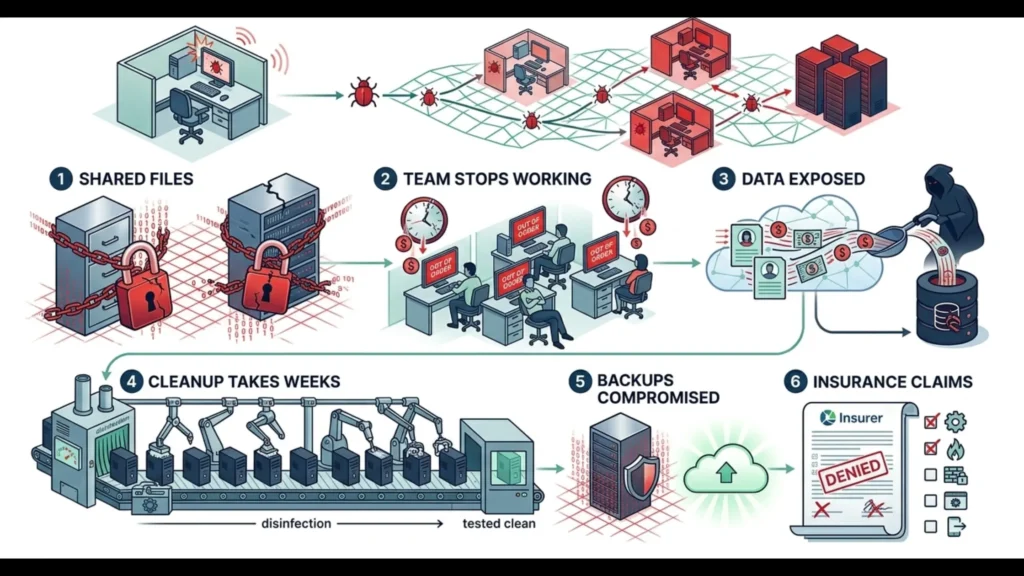
What Happens When Malware Spreads Across Your Office
The damage from a network-wide infection goes far beyond one slow computer. Every additional device affected multiplies the cost and recovery time.
Every Shared File Gets Encrypted or Corrupted
Ransomware follows every network path available and encrypts files on shared drives, backup drives, and connected servers. According to Sophos’ State of Ransomware Report, the average recovery cost for small businesses exceeded $150,000 in 2024, and most of that cost comes from the spread, not the initial infection.
Your Entire Team Stops Working
When malware takes down your server, locks shared files, or crashes workstations across the office, nobody can do their job. Every hour of company-wide downtime costs real revenue and damages the client trust you spent years building.
Client and Employee Data Gets Exposed
Malware that spreads across your network can access and exfiltrate data from every machine it reaches. The Federal Trade Commission (FTC) holds businesses responsible for protecting consumer data, and a breach that could have been prevented with basic security measures can result in enforcement action.
Cleanup Takes Weeks, Not Hours
Removing malware from one computer takes a few hours, but cleaning an entire network where malware has reached servers, workstations, and backup systems can take weeks. Every device needs to be scanned, cleaned, or rebuilt, and the recovery process is exponentially more expensive than prevention.
Your Backups May Be Compromised Too
If your backup drives are connected to the same network, ransomware can encrypt those as well. Businesses that discover their backups were also hit face the worst scenario: no clean data to restore from. This is exactly why offsite and cloud-based backups stored separately from your network are critical.
Insurance Claims Get Complicated
Cyber liability insurers investigate whether adequate security measures were in place before the incident. If your network lacked basic protections like endpoint security, patching, and segmentation, your claim may be reduced or denied because documented security practices are now an insurance requirement, not a recommendation.
What to Do Right Now If You Suspect an Infection
If you think malware is active on your network, these steps need to happen immediately before anything else.
- Disconnect the suspected machine from the network by unplugging the ethernet cable or disabling WiFi
- Do not shut the computer down as forensic data may be needed
- Alert your IT provider or security team immediately
- Do not attempt to clean it yourself with consumer antivirus tools
- Check if other users are experiencing similar symptoms
- Document what happened leading up to the infection including any emails opened or files downloaded
How to Prevent One Infection From Taking Down Your Whole Office
Stopping malware from spreading is about limiting what one compromised machine can reach. These steps create barriers that contain an infection before it becomes a network-wide disaster.
- Deploy endpoint detection and response (EDR) on every workstation and server, not just basic antivirus
- Segment your network so a compromised device cannot reach every other system
- Enforce unique, strong passwords and multi-factor authentication on all accounts
- Keep every operating system and application patched and up to date
- Remove local admin rights from standard user accounts
- Store backups offsite or in the cloud, disconnected from your main network
- Monitor network traffic for unusual activity that signals lateral movement
- Train employees to recognize phishing emails and suspicious attachments

| Spread Method | What It Targets | Prevention |
| Shared network drives | Files on mapped drives and servers | Limit permissions, segment network |
| Internal email | Every contact in infected account | Email filtering, phishing training |
| Worms | Devices with open ports or unpatched software | Patch management, firewall rules |
| Stolen credentials | Any system the user has access to | MFA, unique passwords, least privilege |
| Unpatched software | Known vulnerabilities on connected devices | Automatic patching schedule |
| IoT and printers | Devices with default passwords | Isolate on separate network segment |
| USB drives | Any machine the drive is plugged into | Disable USB ports, endpoint protection |
Conclusion
One infected computer can absolutely spread malware across your entire office. It is not a question of if it can happen. It is a question of whether your network is set up to stop it when it does.
Malware Spread FAQs
Can malware spread through WiFi? Malware does not spread through WiFi signals themselves, but it can spread between devices connected to the same network. If your office WiFi has no segmentation, an infected device can reach every other device sharing that connection.
How fast can malware spread across a network? Some strains spread in minutes. Ransomware like WannaCry infected over 200,000 machines in a single day. Once malware has access to shared drives or admin credentials, it can reach every connected device before anyone notices something is wrong.
How do I know if malware has spread to other computers? Signs include multiple machines slowing down at the same time, files appearing encrypted across shared drives, unusual network traffic, and employees receiving suspicious emails from a colleague’s account. If more than one device shows symptoms, the infection has likely already spread.
Will antivirus software stop malware from spreading? Basic antivirus catches known threats but misses advanced malware designed to evade detection. Endpoint detection and response (EDR) tools provide deeper monitoring that watches program behavior and catches threats that signature-based antivirus cannot.
Does network segmentation really make a difference? Yes. Segmentation limits what a compromised device can access. If your accounting workstation gets infected but is on a separate network segment from your server and other departments, the malware cannot reach those systems. It is one of the most effective containment measures available.